Trying Out Claude Code - Part 1
Building an MVP from scratch with Claude Code
At this point, the hype around LLMs in software development has become impossible to ignore. With the rapid fire release of Opus 4.5, Gemini 3, and ChatGPT 5.2 Codex, it seems many in the programming space have changed their minds about the viability of “agentic coding”, which is the practice of using LLMs to write a large portion of a codebase. These are not all hacks or shameless promoters either - Antirez (the creator of Redis), Addy Osmani (former lead at Google Chrome), and DHH (semi-controversial creator of Ruby on Rails), have all chimed in with how effective these different tools are for writing code, even in larger codebases or non trivial tasks.
At this point, I would wager the vast majority of software developers use AI in some way in their own workflows.
I’m of course not exempt. I started using Cursor early in 2025. Cursor is an IDE with a handy chat sidebar, where you can interact with LLM agents in order to ask questions about your codebase, debug code, and of course, prompt new feature changes.
I was (and still am) a big fan of Cursor, and use it daily at my job. However, I normally keep it on a leash. Working on a mid-sized codebase with around ~8 other developers means cranking out code as fast as possible is not a great idea if the quality and safety of the code can’t be vouched for. I use Cursor to ask questions, brainstorm, rubber-ducky, and write code, but it’s always be under scrutiny and supervision. Cursor is also fantastic for learning new APIs and asking questions about features I did not write, and that provided as much value to me as its agentic, code-writing abilities.
Cursor was my mainstay, and although I had heard of other tools (namely Claude Code), I didn’t see a reason to check them out.
But with the release of these more powerful models, the consensus seems to be that the models themselves are important, but an effective “harness” is equally as required for great results with agentic coding. And many people have said that Claude Code had better intuition when it came to understanding the codebase and writing code, when compared to Cursor.
So amid all of these rumblings online, I decided to put it to the test. If I created a greenfield project, could I make a bug-free, secure web app without writing any code myself? I downloaded Claude Code, and decided to put it to the test on a simple app idea I had been contemplating for a couple of months.
The app
The app is simple CRUD: a customizable way for people to upload their interests and write commentary on them. Different tabs would be different categories of interests (movies, music, books, etc.) that would each contain links to short blog articles written by the user. Sort of like a mix between Linktree and Letterboxd.
I wanted to make this app for a simple reason… I could use it! I feel like theres so many pieces of media that I’ve enjoyed over the years, but I’ve forgotten a my original analyses of them. I could have an organized way of storing my thoughts, that I could come back to whenever i wanted.
OK with that out of the way, how do I actually get this done? This is just an idea, and I don’t have any designs yet.
Designs using AI
So full disclosure - I’m not a designer. I enjoy doing it occasionally, and I can make it work in a pinch if I have to, but it takes me SO LONG. So I decided to use AI to help me out a bit.
First I came up with a minimal set of Figma documents for what I wanted, helped with AI of course. There were a few key pages:
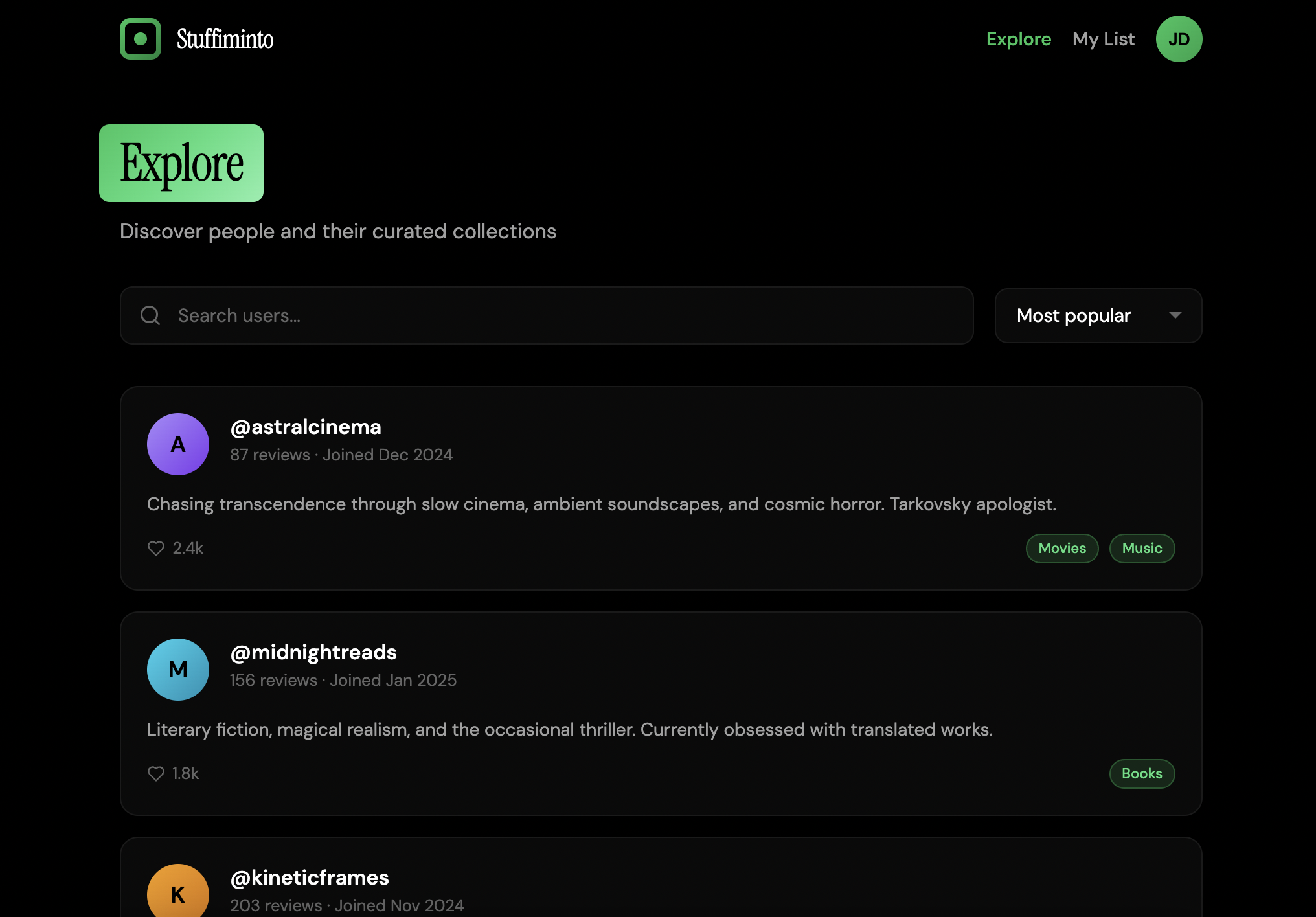
Explore page - For the user to find other users on the app, and view their media.
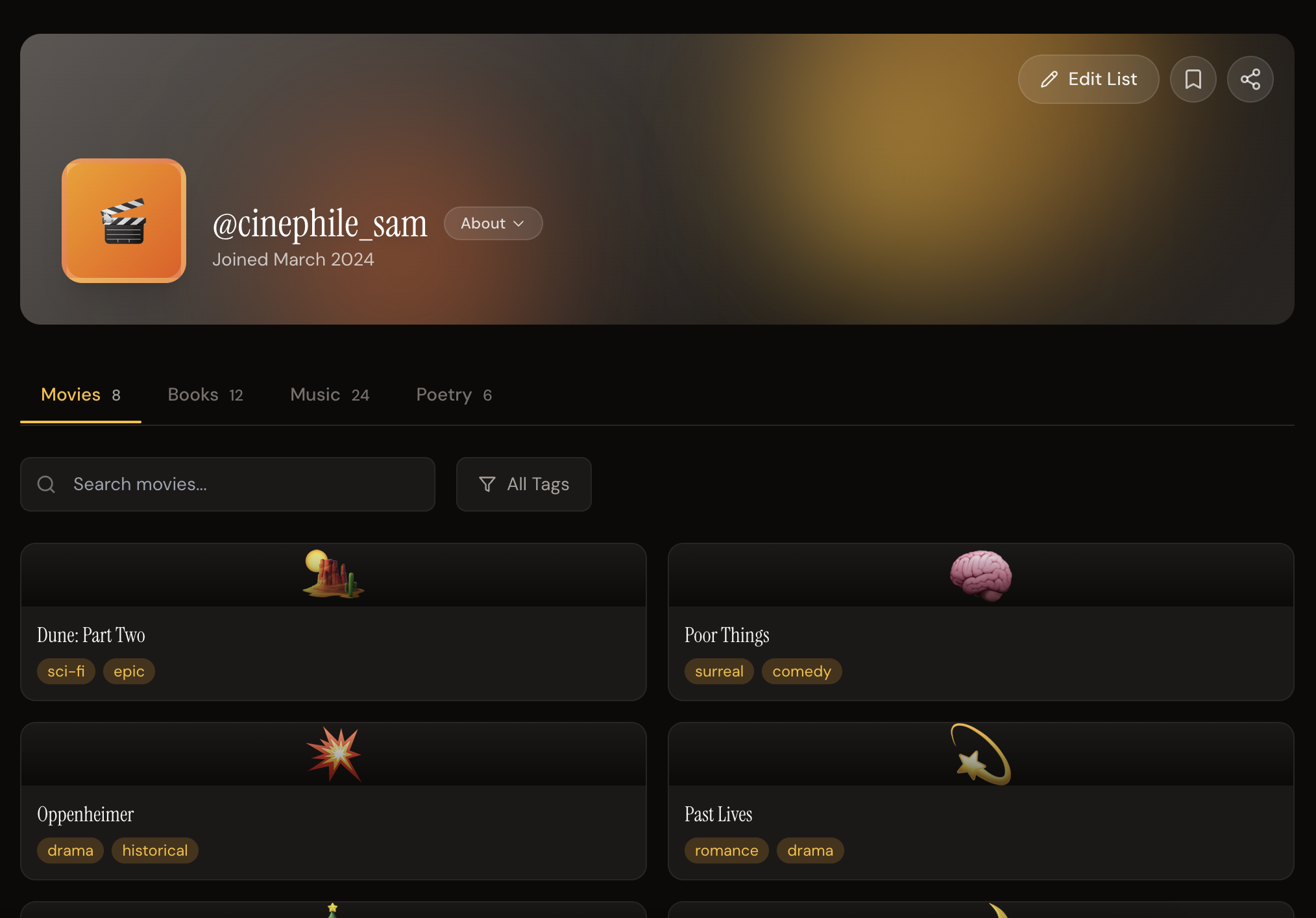
Media List Page - Where a user has their different media categories, with thumbnails of these and links to their reviews. This would include an edit mode, where users can add new categories, tabs, and adjust the theme.
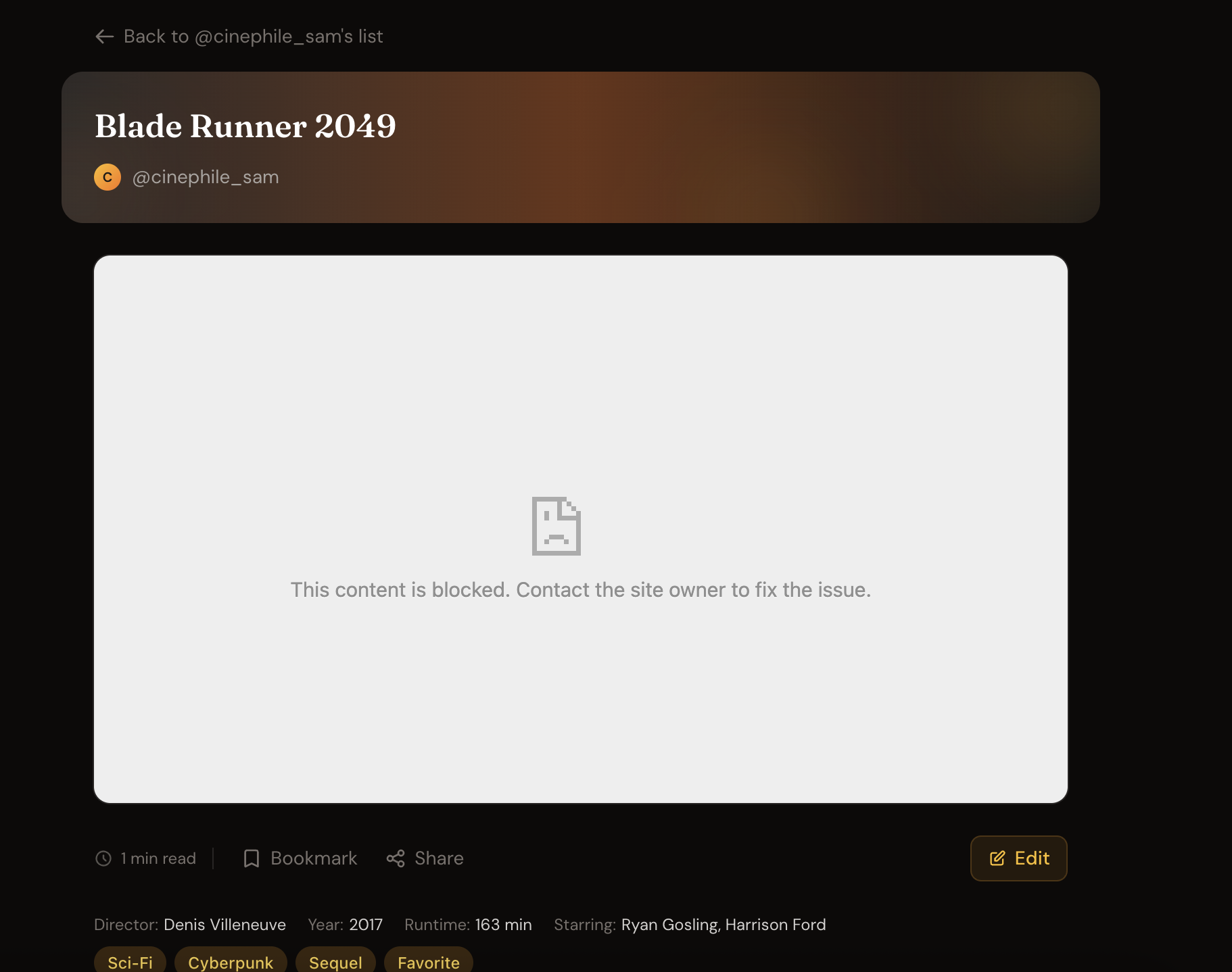
Media Review Page - A short blog-style article where a user can write a markdown section for their review. There would be an edit mode and a create mode for this page.
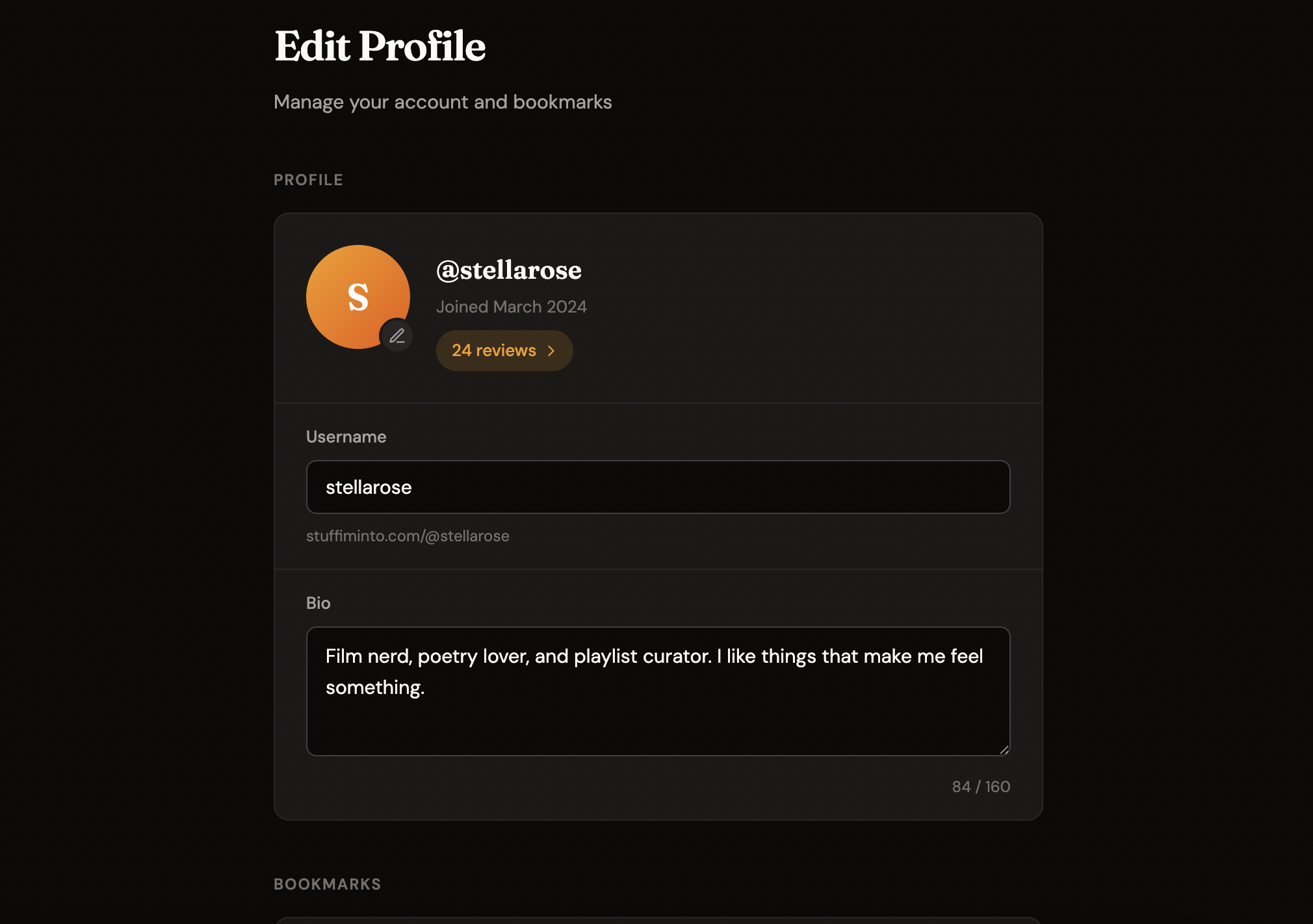
Profile page - where a user can update their profile (bio, profile pic, delete their account, log out, etc.)
So as you can see, a fairly simple CRUD app. The only partially annoying parts would be adding the edit mode for the media review and media list pages, the integration of the markdown viewer/editor, and the media upload.
I had a very primitive, straightforward approach for generating these designs. All I did was open up a new chat in claude, provided a short description of my app, and started asking it for feature ideas on each page.
I started with the media list page, where I asked for a mockup in html + css. Once I had that, which was conveniently rendered directly in the console, I could provide follow up questions and design improvements for what I saw.
I repeated this process for the different pages, each time in a new claude chat. At the end, I had a decent set of designs. I was planning on finalizing the UI later and using shadcn + tailwind anyways, so I was more focused on getting the structure of the page. The pages above are what I was left with.
Overall, not bad! Definitely good enough to start.
One regret I did have though, is doing these early designs in the Claude console. It would have been much more efficient to simply make a static react frontend, and have it generate the code there. That way, I could have the code all in one place, be able to enforce consistent styling more easily, and the agent could reference other pages when making design updates to the current one. By having a new chat for each page, I was essentially starting from scratch, and had to copy paste my overall spec document to each chat.
With these designs though, as well as a new overall spec document, I decided to jump into coding!
Starting out
I said before that I had mainly used Cursor for most of my AI-coding needs. Part of the reason why I chose Cursor was because it was very familiar. For those of you who don’t know, it is a fork of VSCode, the go-to text editor for most web developers. I’ve been using VSCode for years, and I’m comfortable with it and all of the commands, shortcuts, plugins, etc. So when I was first looking into AI coding options about, Cursor seemed like a great choice because it wasn’t big switch up. The same look, feel, and function of VSCode, just with a handy LLM chat window in the side. It even let me import all of my settings and plugins from VSCode.
Claude Code is a different workflow. It’s just a CLI where developers can enter commands and have the agent execute them. At first I was turned off by this. I assumed it meant I wouldn’t be able to easily navigate the code changes made by the agent and decide what I wanted to keep and what to change.
Fortunately, after I downloaded Claude Code and started making changes, I saw this wouldn’t be a huge issue. I could use Claude Code to make changes for a feature, and review the diffs in the git tab of Cursor.
Scaffolding the Project
I wanted to minimize friction and finish an MVP ASAP for this project, so I decided to use a stack I was (mostly) familiar with:
- Frontend: shadCN, React Router 7 Framework Mode, Tailwind, React Query
- Backend: NestJS + Prisma
- Auth + DB: Supabase
To set up the scaffolding, I simply asked Claude to initialize a new project, listing my preferred tech stack for the frontend and backend. It worked very well for initializing the repo from scratch.
With the boilerplate out of the way, I’ll get into the actual coding experience.
The Coding
Overall: Claude Code was impressive when it came to writing code. It performed noticeably (but not drastically) better than Cursor in agentic coding. That said, I still had to make a fair number of interventions and examinations of the output to fix bugs and make sure the app was stable. In the sections below, I’ll go over my thoughts in depth and some of the problems and corrections needed for each feature. If you aren’t as interested in the minutae, I recommend skipping to the last section: “Early Thoughts”
Where Claude Code Had Issues
1. Forgetting Established Patterns
A common issue was Claude Code forgetting patterns I had already set up in the codebase. Despite having React Query configured, it would sometimes make raw API calls. Here’s an example function from the frontend, for creating a new category:
const handleCreateCategory = async () => {
  if (!session || !newCategoryName.trim() || !currentTab) return;

  setIsCreatingCategory(true);
  setCategoryError("");

  try {
    await api.tabs.tabsControllerCreateCategory(
      currentTab.id,
      { name: newCategoryName.trim() },
      { headers: { Authorization: `Bearer ${session.access_token}` } }
    );

    setShowAddCategoryModal(false);
    setNewCategoryName("");
    // Reload the page to show the new category in the dropdown
    navigate(0);
  } catch (error: unknown) {
    const err = error as { response?: { data?: { message?: string } } };
    setCategoryError(err.response?.data?.message || "Failed to create category");
  } finally {
    setIsCreatingCategory(false);
  }
};
The problem: it’s using the API directly instead of React Query mutations. It’s also reloading the entire page (navigate(0)) instead of invalidating queries. I had to go back and fix this in multiple places. The same happened with React Hook Form and ShadCN components. Claude would occasionally reach for vanilla implementations instead of the libraries already in use.
Part of this is on me. I should have updated the Claude.md with more explicit instructions on using established technology in the codebase, instead of doing things from scratch. I think this will be fixed as the codebase grows though. There will be a bunch of examples of React Query already in use, so CC would know this pattern.
2. Poor Abstraction Choices
Claude generated this API setup directly in a route file:
const api = new Api({
  baseURL:
    typeof window === "undefined"
      ? process.env.VITE_API_URL || "http://localhost:3000"
      : import.meta.env.VITE_API_URL || "http://localhost:3000",
});
This should obviously be abstracted into a separate file. You shouldn’t be creating a new API instance in every route that needs it. But same with the use of React Query, this seemed to get fixed once there were more examples in the codebase and I explicitly instructed Claude.
3. Limited Scope Awareness
When I asked Claude to fix an auth-related issue, it correctly solved it for the file I was working in, but didn’t propagate the fix to other files with the same problem. I had to explicitly ask it to search the codebase and update other affected areas, and this took me a bit longer to catch onto because I was not as familiar with Supabase.
The auth issue itself was significant: since the auth was originally JWT with Supabase, the loader is unaware if the user is logged in or not. The client side API requests have the JWT, but the server side logic doesn’t have a cookie. This is a huge problem for features like bookmarks, since we need to know if each review is bookmarked on the list page, but with this limitation we have to do this client-side. Claude initially generated a separate endpoint for this:
@Get('reviews/:reviewId/status')
@ApiOperation({ summary: 'Check if a review is bookmarked' })
async isReviewBookmarked(
  @Req() req: AuthenticatedRequest,
  @Param('reviewId') reviewId: string,
): Promise<StandardResponse<{ bookmarked: boolean }>> {
  const bookmarked = await this.bookmarksService.isReviewBookmarked(
    req.user,
    reviewId,
  );
  return StandardResponse.ok({ bookmarked });
}
This doesn’t make sense - the bookmark status should be on the review DTO itself, not a separate API call for each review.
4. SSR Blind Spots
Claude defaulted to client-side patterns that work fine for SPAs but miss out on SSR benefits. Fortunately these were very easy to fix by just prompting Claude in the right direction a few times.
5. Verbose Boilerplate
The generated code was sometimes more verbose than necessary. Here’s an example of an API call in the loader for getting the categories and reviews:
let categories: { id: string; name: string }[] = [];
let reviews: { items: any[]; meta: { page: number; limit: number; total: number; totalPages: number } } = {
  items: [],
  meta: { page: 1, limit: 10, total: 0, totalPages: 0 },
};

if (currentTab) {
  const [categoriesResponse, reviewsResponse] = await Promise.all([
    api.tabs.tabsControllerFindCategoriesForTab(currentTab.id),
    api.tabs.tabsControllerFindReviewsForTab(currentTab.id, { search, categoryId }),
  ]);
  categories = categoriesResponse.data.data || [];
  reviews = reviewsResponse.data.data || reviews;
}
Here, it’s providing a fallback for reviews with empty data. But it’s far more succinct to just make the reviews the same type as reviewsResponse.data.data (the PaginatedReviewsDto from the generated API types). The reviews service also ended up with extensive interface definitions (ReviewUser, ReviewTab, ReviewCategoryRelation, RelatedReviewRelation) and mapping logic that could have been simplified.
6. Ugly URLs
On the frontend, for a user’s media list page, the URL for a specific tab was originally the following:
http://localhost:5173/filmfanatic/f36d90e6-20c9-4610-925a-363cc02787c0?category=0393d857-6fa2-4542-a403-b46a040f7ad3Clearly this doesn’t look the best! It’s a very long URL and the IDs are a bit confusing. We needed slugs for the category and the tab, but this was a very easy fix to make.
7. Debugging DTO Issues
Updating the user bio didn’t work initially. This was because I had validatorPipe: whitelist: true configured. Took some debugging to realize the issue was in my updateUserDto:
@ApiPropertyOptional()
@IsOptional()
@IsString()
bio?: string;
The decorators were correct, but the whitelist setting was stripping the field. It took some back and forth with Claude before I noticed that this was the issue, and there were a few places in the codebase I had to add Class Transformer annotations to make sure the fields weren’t stripped.
Where Claude Code performed well
1. Smart Optimizations
I was genuinely impressed when Claude automatically grouped two API calls into a Promise.all, without me asking:
const [categoriesResponse, reviewsResponse] = await Promise.all([
  api.tabs.tabsControllerFindCategoriesForTab(currentTab.id),
  api.tabs.tabsControllerFindReviewsForTab(currentTab.id, { search, categoryId }),
]);
I had added the categories call first, and when I asked for reviews, Claude recognized both could run concurrently. This kind of optimization is easy to miss when coding manually.
2. Following Patterns Once Established
After I clarified how I wanted the backend structured (DTOs, paginatedResponse decorators, separate modules), Claude consistently followed those patterns. It was notably better than Cursor at remembering to run the API generator after backend changes.
3. Integration Walkthroughs
The Supabase integration went smoothly. Claude walked me through bucket creation and policy attachment step by step. When I hit an error with YouTube ID storage, it helped me debug it.
I haven’t worked with markdown editors in a while. Claude gave me a working solution very quickly. That being said, part of me thinks this is a double edged sword. Sure I got a working solution, but am I really aware of why we did this approach instead of using a different library, such as TipTap? This was a task where I think I could have done a bit more planning on these features (which is recommended by Anthropic, using the planning mode) in order to weigh the pros and cons of different approaches.
Feature Videos
Click through to see each feature in action:
Explore Page - Search and discover other users
Media List Page - Browse a user’s media categories and reviews
Create Review Page - Write and publish a new review
Profile Page - Manage your account settings
Early Thoughts
I was impressed with Claude Code’s ability to generate code. This was a noticeable improvement over a previous experimentation with Cursor + Sonnet 4.5 during the summer. During that project, I could get the app working, but it took a lot more prompting and course correction. I think a lot of these claims of generating 90% of an app’s code with Claude Code are not that unrealistic.
As it stands now though, this MVP I created is still… a bit lacking. There’s a few small features I want to add, I have to test it more, and the design is currently dreadful. It’s using the basic ShadCN styles and the UX needs to be polished.
So, I will probably be back in a few days with the app fully finished, and give my deeper thoughts on Claude Code. See you then!